Tech Series · 10
VPN: What It Is, Who It's Actually For
Not the privacy shield the ads sell you. A VPN is real infrastructure, built for secure remote access at work.
On this page6 sections
You've seen the ads. Some YouTuber with a promo code telling you your data is stolen every second you're not using one.
That's mostly noise. Here's what a VPN actually is.
What Is It?
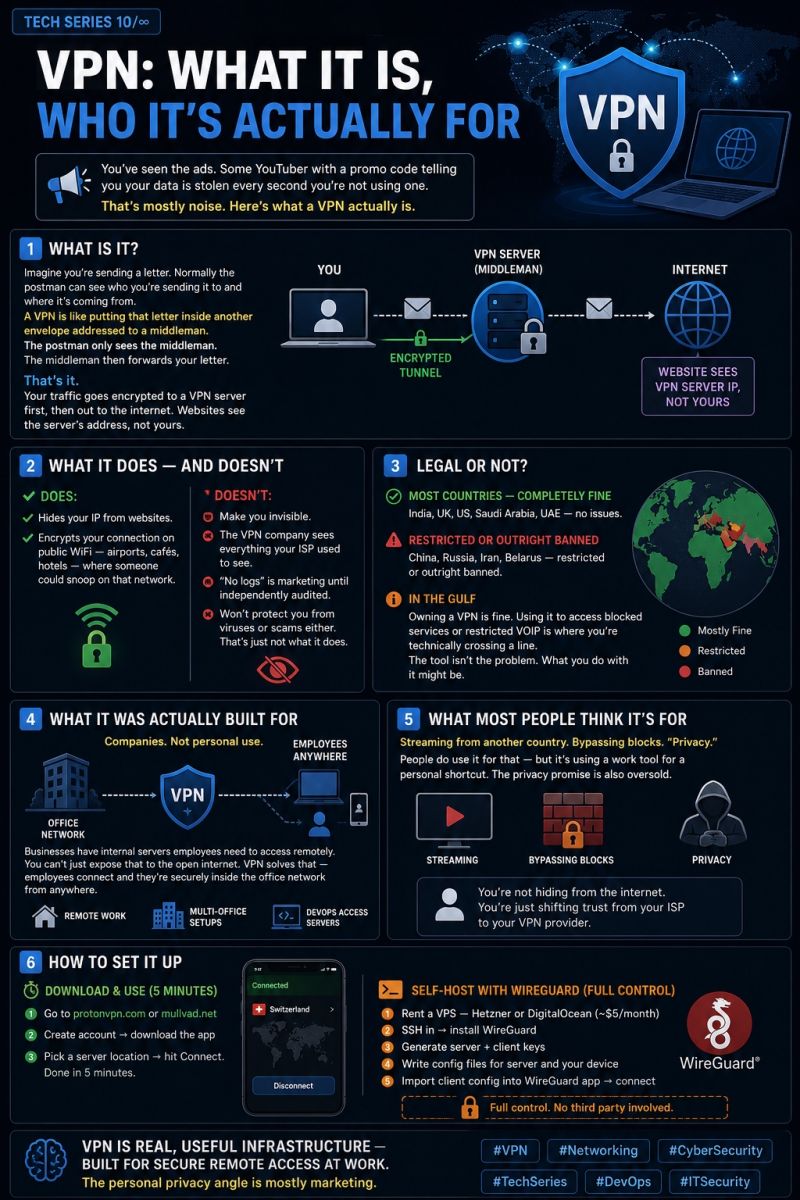
Imagine you're sending a letter. Normally the postman can see who you're sending it to and where it's coming from. A VPN is like putting that letter inside another envelope addressed to a middleman. The postman only sees the middleman. The middleman then forwards your letter.
That's it. Your traffic goes encrypted to a VPN server first, then out to the internet. Websites see the server's address, not yours.
What It Does — And Doesn't
It hides your IP from websites, and encrypts your connection on public WiFi — airports, cafés, hotels — where someone could snoop on that network.
What it doesn't do: make you invisible. The VPN company sees everything your ISP used to see. "No logs" is marketing until independently audited. It won't protect you from viruses or scams either. That's just not what it does.
Legal Or Not?
Most countries — completely fine. India, UK, US, Saudi Arabia, UAE — no issues.
China, Russia, Iran, Belarus — restricted or outright banned.
In the Gulf — owning a VPN is fine. Using it to access blocked services or restricted VOIP is where you're technically crossing a line. The tool isn't the problem. What you do with it might be.
What It Was Actually Built For
Companies. Not personal use.
Businesses have internal servers employees need to access remotely. You can't just expose that to the open internet. A VPN solves that — employees connect and they're securely inside the office network from anywhere.
Remote work, multi-office setups, DevOps engineers accessing servers. That's the real use case.
What Most People Think It's For
Streaming from another country. Bypassing blocks. "Privacy."
People do use it for that — but it's using a work tool for a personal shortcut. The privacy promise is also oversold. You're not hiding from the internet. You're just shifting trust from your ISP to your VPN provider.
How To Set It Up
Download & use:
- Go to protonvpn.com or mullvad.net
- Create account, then download the app
- Pick a server location, hit Connect. Done in 5 minutes.
Self-host with WireGuard (full control):
- Rent a VPS — Hetzner or DigitalOcean (~$5/month)
- SSH in, then install WireGuard
- Generate server and client keys
- Write config files for the server and your device
- Import the client config into the WireGuard app, then connect
No third party involved.
VPN is real, useful infrastructure — built for secure remote access at work. The personal privacy angle is mostly marketing.
Originally published on LinkedIn.
Read the series — Tech Series
Tech Series index- 01Why DevOps (And What It Really Is)
- 02Zero to 100: Servers, Cloud, and Networking Foundations
- 03Cloud Under Fire: What Every Tech Leader Must Learn
- 04Why Big Tech Companies Still Go Down
- 05The Silent War Happening Inside Every Tech Company
- 06The Internet Was Never Designed to Be This Big
- 07Why the World's Most Expensive Software Keeps Failing
- 08AI Is Inside Your Pipeline. Most Teams Run It Wrong.
- 09The Japanese WordPress Hack: Zero To 100
- 10VPN: What It Is, Who It's Actually For (this piece)
- 11Why "Full-Stack" Stopped Being Optional
- 13What Is System Design And Why You Should Care

Muhammed Nasvih V
Lead DevOps & Cloud Engineer · Jeddah, Saudi Arabia
Writes The Stack Notes — field notes on infrastructure, AI, money and work. Cloud infrastructure, CI/CD, security and automation at Code7 Information Technology.